
Snowflake and dbt for E-Commerce Analytics: How We Built a Shopify Data Platform
How Reactiv uses Snowflake and dbt to turn raw Shopify data into merchant analytics: our warehouse architecture, event-driven ETL and lessons learned.
April 2, 2026
14 Min Read
In this article

Subscribe to Our Newsletter
Get mobile commerce insights. No fluff, just what you need to build smarter.

Key takeaways
We built a multi-tenant analytics platform using Snowflake as our data warehouse, dbt for data transformation, and an event-driven serverless pipeline on AWS for ingestion. This article covers why we chose each technology, how they work together, and what we learned running the stack in production.
How we use Snowflake, dbt, and serverless AWS services to turn raw Shopify data into merchant analytics at scale
Why Shopify Merchants Need a Dedicated Analytics Platform
Shopify gives merchants the essentials: orders, revenue, basic traffic. The deeper questions need a data platform built for them: which customer segments drive repeat purchases, how a promotion actually performed compared to last quarter, what to stock heading into the holidays. That’s where we come in. We built our e-commerce analytics platform on Snowflake and dbt because those questions don’t answer themselves.
At Reactiv, I work on the data infrastructure that powers all of this. The goal sounds simple: ingest Shopify data, transform it into useful metrics, serve it to merchants. But we’re doing it for dozens of merchants simultaneously, each with wildly different data volumes and query patterns. Some stores process hundreds of orders a day. Others are quiet for weeks and then spike during a sale. Metrics like ROAS require stitching together data across multiple sources. You can’t compute that from a single Shopify export.
What started as a dashboard project turned into building a proper data platform. Ingest reliably, transform correctly, serve multiple consumers (dashboards, AI agents), and don’t let it become a full-time ops burden. The ops burden constraint shaped almost every decision that followed.
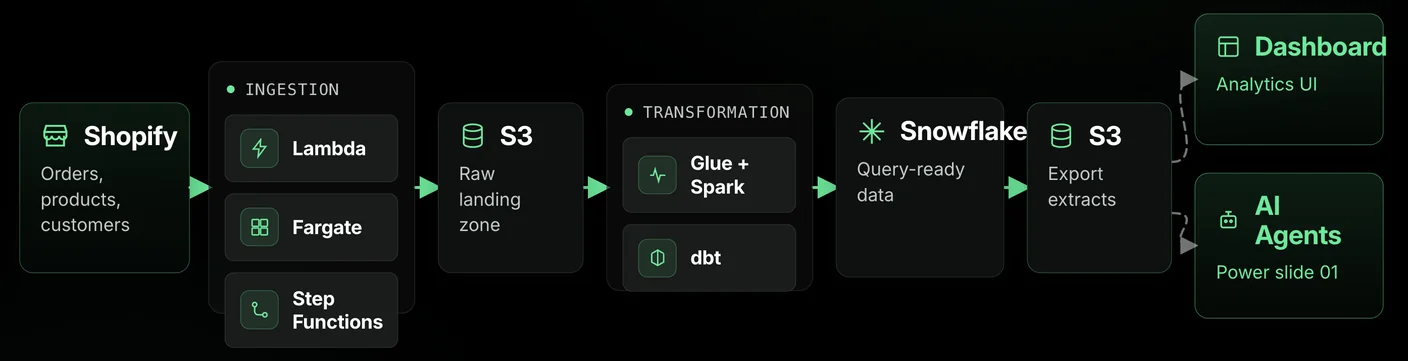
Snowflake Data Warehouse: The Foundation for Multi-Tenant E-Commerce Analytics
The first decision that shaped everything else: where does the data live? We looked at several options and landed on Snowflake. In hindsight, it’s the single choice I’d make again without hesitation.
Solving Multi-Tenant Data Isolation
The classic multi-tenant problem: how do you serve merchants with wildly different workloads from a single platform without one merchant’s heavy query degrading everyone else’s experience?
Snowflake handles this at the architecture level. Merchants share the platform, but compute is fully separable. A merchant running a complex year-over-year analysis doesn’t touch another merchant’s dashboard. We didn’t have to build isolation logic ourselves — it’s just how Snowflake works.
Snowflake Virtual Warehouses for Workload Isolation
This is the feature that sold us. Virtual warehouses let you spin up completely independent compute clusters for different workloads. We run separate warehouses for ingestion, metric computation, and AI analytics.
In practice: when our pipeline is pulling a big Shopify data export, that compute is totally isolated from the warehouse serving merchant dashboards. When an AI batch job is crunching through historical patterns, it’s on its own cluster. Nobody’s competing for resources.
We evaluated shared-compute alternatives and they all had the same problem: endless tuning of priority queues and resource limits to keep workloads from stepping on each other. With virtual warehouses, that problem disappears.
Storage and Compute Separation for E-Commerce Scale
Snowflake separating storage from compute changed our cost math. We keep everything (every order, every product change, every customer event) because storage is cheap and decoupled from compute. We only pay for compute when something’s actually running.
E-commerce data is bursty by nature. Black Friday can be 10x normal volume. A merchant running a flash sale might dump a spike of orders that needs processing fast. We don’t pre-provision for those peaks. Compute scales up, does the work, scales back down. No idle clusters burning money.
Snowflake S3 Integration for Simplified Data Ingestion
Our ingestion pipeline naturally lands data in S3. That’s where Shopify exports end up after download. Snowflake’s external stages let it read directly from those S3 paths. No additional copy step, no intermediate staging infrastructure.
This saved us from building an entire data-shuffling layer that would have added complexity for zero analytical value. Data lands in S3, Snowflake reads it. One less thing to maintain, one less thing to break at 2 AM.
Snowflake as the Single Source of Truth
dbt transforms run inside Snowflake, and the resulting metrics get exported to S3 for the application layer. There’s one version of the data. One place metrics are computed. Dashboards and AI agents consume the same numbers.
“Single source of truth” is an overused phrase, but the alternative is real: different consumers maintaining their own transformation logic, numbers drifting apart, merchants seeing one figure on their dashboard and a different one from the AI. We’ve seen teams at other companies struggle with that for years. We avoided it by making Snowflake the one place where computation happens.
Why Choose Snowflake Over Redshift or BigQuery for Shopify Analytics
We did evaluate alternatives. What tipped it wasn’t any single feature. It was how everything fit together: virtual warehouses for workload isolation, storage/compute separation for our bursty patterns, native S3 integration, and strong ecosystem support for dbt and Spark connectors.
Snowflake didn’t just solve the warehouse problem. It made the downstream decisions (how to transform, how to serve, how to scale) noticeably easier.
dbt Data Transformation: Turning Raw Shopify Data Into Merchant Metrics
Raw Shopify data in Snowflake is just tables. Orders, products, customers are useful on their own, but they don’t answer the questions merchants actually ask. The gap between “raw data in a warehouse” and “metrics a merchant can act on” is where most of the real engineering lives.
Why dbt for Data Transformation
Before dbt, our transformation layer was headed toward becoming a pile of SQL scripts with unclear dependencies and no tests. We’ve all seen that movie. A column changes upstream, nobody notices until a dashboard shows wrong numbers, and then you’re tracing through scripts by hand trying to figure out the dependency chain.
dbt gave us the structure we lacked: dependency graphs, built-in testing, auto-generated docs, all while keeping everything in SQL. That matters because SQL is the one language everyone on the team can write. The barrier to contributing a new model is low, but the engineering discipline is real.
dbt’s Native Snowflake Adapter: Zero Data Movement
The dbt + Snowflake pairing is strong for a specific reason: dbt’s native Snowflake adapter runs all transformations inside Snowflake’s compute. No data leaves the warehouse. dbt defines the transforms, Snowflake executes them. And because of virtual warehouses, we can route heavy transformation workloads to dedicated compute without affecting the clusters serving dashboards.
There’s no ETL-style extract-transform-load dance. It’s just T, running where the data already lives.
Layered dbt Model Architecture
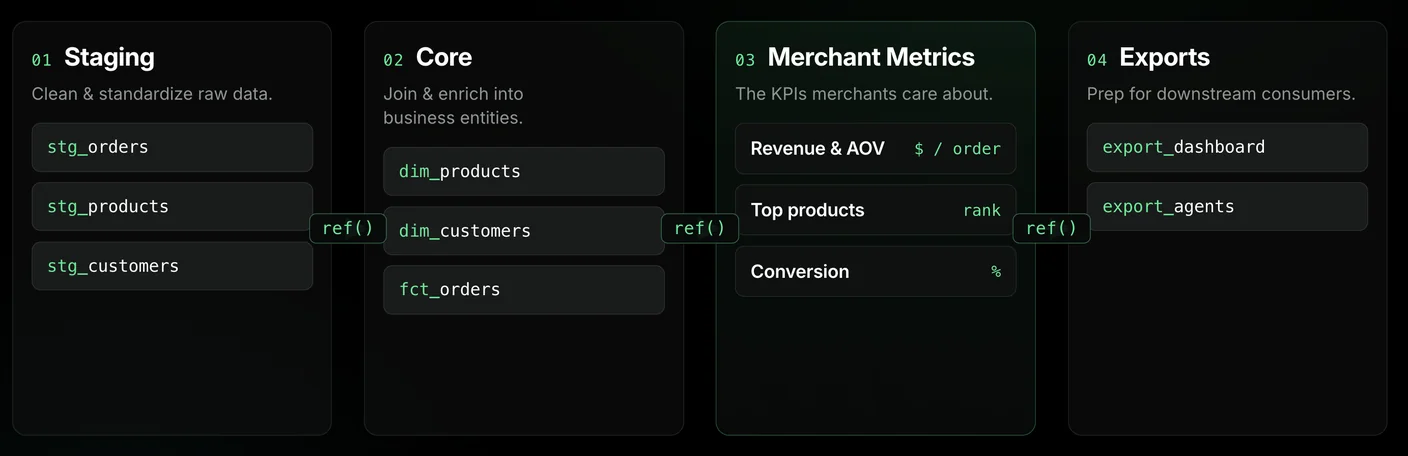
We organized models into layers: staging (clean and standardize raw data), core (join and enrich into business entities), merchant metrics (the KPIs merchants actually care about), and exports (prep for downstream consumers).
The layering matters more than it sounds. When something breaks (and things break), you know immediately which layer to look at. When you add a new metric, you’re composing from existing layers, not writing from scratch.
dbt Incremental Models for Cost-Efficient Processing
Incremental models are one of the biggest practical wins. Instead of reprocessing a merchant’s entire order history every run, we only process what changed. For merchants with years of data, that’s the difference between a 5-minute run and an hour-long one.
It also keeps Snowflake costs predictable. You’re only spinning up compute for the delta (new orders, updated products, recent activity), not the full historical dataset. dbt’s incremental logic paired with Snowflake’s pay-per-query pricing means our per-merchant costs scale linearly with data volume, not explosively.
Tag-Based Workload Orchestration in dbt
Not every model needs to run on the same cadence. The daily merchant-facing pipeline should be fast. The AI-focused analytical models can take their time. We use dbt’s tag system to separate these: tag by purpose, run targeted builds. The daily pipeline stays snappy, and heavier analytical builds run on their own schedule without blocking anything.
We’ve also built custom materializations for merchant-specific delivery patterns. Different merchants have different needs, and dbt’s extensibility let us encode that logic in the transformation layer itself rather than bolting it on downstream.
Event-Driven ETL Pipeline: Why We Chose It Over Batch Processing
Getting data into the system turned out to be the most architecturally interesting part of the whole project. Shopify’s data export model doesn’t fit the “run a script every hour” pattern, and trying to force it into one would’ve been a mistake.
The Shopify Bulk API Challenge
Shopify’s bulk API is async. You submit a request, Shopify processes it in the background, you poll until it’s done, then you download the result. Completion time varies: seconds for small exports, minutes for large ones.
Try modeling that with a cron job. You’d need to track partial completions across merchants, handle timeouts and retries, deal with one merchant finishing quickly while another is still processing. We sketched it out and realized we’d basically be building a state machine by hand. So we built an actual state machine instead.
AWS Step Functions for Pipeline Orchestration
Each data stream (orders, products, customers) follows a Step Functions workflow: submit the bulk request, wait for completion, download results, trigger transformation. Every step has its own retry logic and error handling.
The big win is debuggability. When something fails at 3 AM (and when you’re talking to external APIs, it will), the execution history shows exactly which step failed and why. No reading through cron logs trying to figure out where a shell script died. You look at the Step Functions console, see the failed state, and know immediately what happened.
Event-Driven Architecture Over Scheduled Jobs
The broader shift was going event-driven instead of schedule-driven. Credential changes trigger syncs. Data arriving in S3 triggers transformation. Transformation completion notifies downstream consumers. Work happens when there’s work to do.
The default instinct is always “just run it on a cron.” Event-driven is more upfront complexity in exchange for less wasted compute and lower latency between data availability and processing. For our use case, it was clearly worth it.
Serverless AWS Services: Lambda, Fargate, Glue, and S3
The ingestion layer is Lambda for coordination (API calls, status checks, event routing), Fargate for heavy lifting (downloading and parsing large exports), and Glue/Spark for the transformation into Snowflake.
A few things we learned the hard way: some merchants have product catalogs large enough that you can’t just buffer the whole export in memory. Our Fargate downloaders stream data in chunks, processing as it arrives rather than loading everything first. That was a necessary evolution once we started onboarding larger stores.
The Spark-to-Snowflake integration deserves a mention because it’s not a simple load. Spark performs upsert logic, merging incoming records with existing Snowflake data so updates apply cleanly without duplicates. Getting the SQL semantics and connector compatibility right was a painful few days of debugging, but once it stabilized, it became one of the most reliable parts of the whole system.
S3 is the connective tissue. Every service’s output lands there, and the next service picks it up. It’s simple, and that simplicity is the point.
Why Serverless ETL Over Self-Hosted Infrastructure
We could’ve run Airflow. We could’ve managed our own Spark cluster. We chose not to.
There are legitimate reasons to self-host: more control, fewer vendor constraints, sometimes lower cost at scale. But we’re a team building a merchant-facing product, not an infrastructure company. Every hour spent managing Airflow DAGs or debugging Spark cluster health is an hour not spent on the analytics that merchants actually see. Managed services let us stay focused on the data logic. The vendor coupling is real, but for us, it’s a trade worth making.
From Snowflake to Shopify Dashboard: Delivering Merchant Analytics
None of this matters if merchants can’t see the results. A data platform that only engineers can query is just an expensive hobby. The “last mile” of getting computed metrics from Snowflake into merchant hands is where all the upstream investment either pays off or doesn’t.
The Export Pattern: Snowflake to S3
dbt computes metrics inside Snowflake, the final pipeline step exports them to S3, and the application layer reads from S3.
We’re not running Snowflake warehouses to serve live dashboard queries. That would be expensive and unnecessary. Snowflake does the heavy computation (joins, aggregations, incremental processing), exports the results, and shuts down. S3 serves as the delivery layer. It’s fast, cheap, and stateless.
Analytics Inside Shopify
Our dashboard is a Shopify embedded app. Merchants see analytics directly inside the Shopify admin they already live in every day. No separate login, no new tool to learn. Since mobile commerce is where most merchants manage their stores, having analytics embedded in Shopify means they’re accessible wherever the merchant is.
We could’ve built a standalone analytics product. But analytics that live where merchants already work get used. A separate tool, no matter how polished, directly impacts conversion because it adds a step between question and answer. We’ve seen this empirically: merchants engage with embedded analytics far more than they’d engage with a separate tool.
Same Data, Multiple Consumers
Dashboards and AI agents both consume the same exported metrics. A merchant looking at a revenue chart and then asking the AI “how did my sales do last month?” gets the same number both times. No divergence, no dashboard saying one thing while the AI says another.
That consistency doesn’t happen by accident. It’s a direct consequence of having one computation layer (dbt in Snowflake) and one export path (S3). If each consumer maintained its own transformation logic, numbers would drift. I’ve seen that pattern at previous jobs and it’s a nightmare to debug. We avoided it by design.
The Clean Data Layer Pays Off
When we first built the dbt layer, the only consumer was the dashboard. But because we modeled things properly and tested rigorously from the start, adding AI agents later was incremental, not a rewrite. They just read the same exported data. The hard work (deciding what to compute, how to compute it correctly, how to keep it fresh) was already done.
If you take one thing from this section: invest in your data modeling layer early, even if you only have one consumer today. The second and third consumers (AI agents, engagement channels like push notifications or SMS, internal tools) come cheap when the foundation is right. If you cut corners on the first consumer, adding the second becomes a rewrite project.
Lessons Learned Building an E-Commerce Data Platform
A few things I’d tell past-me if I could go back to the start of this project.
Pick your warehouse first, not your pipeline. We chose Snowflake before writing a single Lambda function, and that sequencing mattered. Virtual warehouses shaped our workload isolation. S3 integration simplified ingestion. Native dbt support meant the transformation layer slotted in cleanly. If we’d built the pipeline first and then gone shopping for a warehouse to fit it, we’d have been working around constraints instead of building on strengths. The warehouse is the foundation. Choose it first.
Don’t self-host things unless that’s your actual job. No Airflow, no self-managed Spark clusters, no fleet of EC2 instances. Snowflake, Step Functions, Glue — managed services across the board. Every hour not spent on infrastructure health is an hour spent on the merchant experience. For a team building a product (not an infrastructure company), that leverage is everything.
Test your data, not just your code. Data quality issues don’t throw exceptions. They just make numbers wrong. A metric that silently drifts by 5% is worse than one that errors loudly, because nobody notices until a merchant does. dbt’s testing framework caught things for us that would’ve been embarrassing in production. Uniqueness violations, referential integrity breaks, values outside expected ranges. We test every model. It’s not optional.
Build the metrics layer right the first time. When we started, the only consumer was the dashboard. We could’ve cut corners. Instead, we modeled things properly and tested rigorously, which meant adding AI agents later was a matter of days, not months. They just read the same exported data. If we’d built a dashboard-specific pipeline, adding a second consumer would’ve been a rewrite.
Production will surprise you. Automate your deployment checks. A pipeline that works in staging can still break in production for non-obvious reasons: stale infrastructure references, container images getting garbage-collected before old pointers update, SQL connector behavior differing across environments. We learned (the hard way) to treat post-deployment verification as part of the deployment, not a follow-up. Automated health checks after every deploy have caught issues that would’ve become incidents.
The stack is solid now. Reliable ingestion, Snowflake for the analytical heavy lifting, dbt for tested transformations, S3 for delivery. Adding new capabilities is incremental, each one building on everything below it. We’re not done, but we’re building from a foundation that actually holds up.
Want to learn more about how Reactiv helps Shopify merchants unlock their data? Visit reactiv.ai to see our analytics platform in action.
FAQ
How does Shopify’s bulk API differ from its REST API?
The REST API returns data synchronously in a single request, which works for small datasets but falls over for large exports. The bulk API is asynchronous: you submit a GraphQL query, Shopify processes it in the background, and you poll until it’s done before downloading the result as JSONL. For any merchant with meaningful order or product history, the bulk API is the only practical option, because it doesn’t time out and handles pagination internally. It forces you to build a state machine to track submission, polling, and download — but that’s a worthwhile trade for the ability to export millions of records reliably.
When should you use dbt incremental models?
Use incremental models when a table has a reliable updated-at or created-at column and reprocessing the full history every run costs real money or time. Orders, events, and append-heavy tables are ideal candidates. Don’t use incremental for small dimension tables (products, customers under ~100K rows) — the complexity isn’t worth it and a full-refresh table materialization stays simpler. The rule of thumb: if a full refresh takes more than a few minutes or your warehouse bill is visibly shaped by it, switch to incremental.
Why event-driven ETL over scheduled jobs?
Scheduled jobs assume you know when data will be ready. With Shopify’s bulk API, you don’t. Completion times vary from seconds to many minutes per merchant. A cron running every hour either runs too often (wasted compute) or misses late completions (stale data). Event-driven pipelines trigger work when the work is actually available: credential changes kick off syncs, S3 arrivals kick off transformations, transformation completions kick off exports. You pay more in upfront design complexity, but you avoid the worst of both worlds: idle compute and stale pipelines.
How do you isolate workloads between merchants in Snowflake?
Snowflake’s virtual warehouses let you spin up independent compute clusters per workload. We run separate warehouses for ingestion, dbt transformation, and AI analytics, so a heavy backfill for one merchant can’t slow down dashboard queries for another. Storage is shared across the account, but compute is fully separable and auto-suspends when idle. You don’t have to build per-tenant queuing or priority logic — it’s architectural, not something you implement.


See Reactiv on your storefront.
Book a demo and we'll walk you through native apps and App Clips running on your Shopify store.