
What Is an App Clip? The Complete Guide to iOS Mini Apps
With Apple’s App Clips, users can access a lightweight version of an app instantly — no download required.
March 20, 2026
11 min read
In this article

Subscribe to Our Newsletter
Get mobile commerce insights. No fluff, just what you need to build smarter.
Do you remember playing Snake?
Whether you have fond memories of slithering across a tiny Nokia screen or that reference just made us look super old, Snake is widely considered one of the first mobile phone apps. Shipping pre-installed on Nokia phones in the late 1990s, it was the catalyst for phones being more than, well, phones.
We won’t bore you with a full history of mobile apps, but fast-forward to today, and apps are synonymous with smartphones. They’re integrated into nearly every part of our lives—from entertainment and shopping to banking and transportation.
Apps are also widely understood as programs that are either pre-installed on a device or downloaded from an app store.
But there’s actually a third type.
With Apple’s App Clips, users can access a lightweight version of an app instantly — no download required.
The “5-second” App Clip definition
App Clips are fast and lightweight, so we’ll give you a definition that’s fast and lightweight too.
First introduced by Apple in 2020, an App Clip is a lightweight (under 15MB) version of an app that launches instantly, with no download required.
Let’s face it: custom apps are expensive and not in the cards for every brand. Plus, even if you have one, downloading an app can feel like a commitment. People are selective about what earns a permanent spot on their home screen.
App Clips remove that barrier and allow businesses to deliver an app-like experience in the moment — without asking users to install anything. If you’re familiar with Reactiv Clips, our instant app experience platform, App Clips are the technology Reactiv Clips is built on.
How it works: the 4 triggers of App Clips
Sort of like the 4 horsemen of the app-pocalypse, there are 4 ways to trigger an App Clip. Each one has unique benefits and use cases that give App Clips the potential to be useful for almost any type of business.
NFC tags
Physical NFC tags can be used to launch an App Clip through a simple tap of a phone, functioning as the perfect bridge of digital and physical experiences.
Because the interaction is instant and intentional, NFC tags are especially powerful for adding digital functionality in real-world environments. For example:
- A digital loyalty card that adds a stamp each time a customer taps in-store
- Locking mechanisms on things like electric scooters or bikes that use App Clips to lock and unlock with a quick tap
- Product packaging that launches setup instructions or warranty registration directly from the box
QR codes
QR codes are another powerful way to bridge digital and physical experiences. Customers are already accustomed to scanning QR codes to open a URL, so the behavior itself isn’t new.
But instead of sending users to a static webpage, businesses can use QR codes to open an App Clip – delivering an instant, app-like experience from anywhere.
Because of their universality and ability to be stuck on almost anything, QR codes are especially effective for speed and convenience, such as:
- A tabletop QR code at a restaurant that a customer scans to launch an App Clip for browsing the menu, ordering, and paying
- A printed QR code on printed marketing tactics (like a drop card) so businesses can tie an app-like experience to a direct mail campaign
- QR codes on in-store signage that open a Clip with product details, sizing guides, reviews, or availability
Apple App Clip Codes
Apple’s App Clip codes are an Apple-designed hybrid of NFC and QR codes. They look sleeker than your typical QR code (which is great if you don’t want your marketing materials to include a black and white box) and are designed specifically for opening up App Clips.
Unlike standard QR codes, App Clip Codes can also incorporate NFC functionality. That means customers can either scan the code or simply tap their phone against it to open the Clip.
App Clip Codes have essentially the same use cases as QR codes and NFC tags. NFC-enabled clip codes are the best choice for physical display (print tactics, signage, packaging, etc.), while scan-only clip codes are best for digital displays or situations where the signage they’re displayed on will be out of reach from customers.
Digital links
Direct links are exactly what they sound like – direct links to an App Clip. While not as snazzy as an App Clip Code, they’re the simplest and easiest way to digitally direct a customer to an App Clip.
Because they function like any standard link, digital links can integrate seamlessly into almost any online campaign. Some effective use cases include:
- Social media ads that open directly into a product-focused App Clip
- SMS campaigns, such as abandoned cart reminders, that return customers to an app-like checkout experience
- Apple Maps or Google Maps listings that instantly launch booking or ordering flows
The App Clip user journey
While understanding the triggers is crucial, it’s meaningless without a strong user journey. Remember how good it felt to slither around in Snake in a zen-like flow? Your user journey should feel the same – flowing quickly and seamlessly from trigger to conversion.
Step 1: The trigger
The first step is engaging a customer through one of the triggers discussed above. Whether they scan a QR code, tap an NFC tag, or click a digital link, the goal is simple: get them into the App Clip experience with minimal effort.
Step 2: Launching the card
Once triggered, an App Clip Card appears. This acts as a lightweight preview of the experience – think of it like a quick bit of window shopping before the customer proceeds. It typically includes an image, title, subtitle, and an “Open” button.
If the customer chooses to proceed, they tap “Open” and the Clip launches instantly.
Step 3: Signing in or paying with Apple
Depending on the experience, the next step usually involves signing in with Apple or paying with Apple Pay.
This is where the beauty of App Clips really shines. They’re designed for speed and convenience, and syncing with an Apple account means users don’t need to create another login or password.
It’s fast, secure, familiar, and easy. Of course, it’s important to always give the option of a guest checkout too.
Step 4: Completing the task
The final step is nice and simple – completing the task!
Whether it’s ordering food, unlocking a door, or purchasing a shirt, the entire interaction happens within a mini app experience without unnecessary redirects, downloads, or setup screens.
Key benefits of App Clips
Up to this point we’ve explored how App Clips work and the user journey from scan to conversion. But you might still be wondering why App Clips are such a game-changer. What sets them apart from a traditional app or from simply sending someone to a static webpage via a QR code?
App Clips provide a number of benefits that make them a powerful tool to have in your marketing arsenal.
Native app experiences without the download
An app download is a big ask.
77.9% of customers have said a mandatory app installation made them abandon a transaction, with that number going up to 87.1% for people aged 18 - 24.
With expandable storage being a thing of the past on most mobile devices, people are understandably pretty picky about what earns a coveted spot on their home screen. Even if your app is worth installing, asking someone to download it introduces extra steps — and extra opportunities for them to drop off.
The problem is, apps often provide a much better user experience than a mobile web page. Historically, brands have had to choose between locking stronger functionality behind an app download, or simplifying their app experience to have feature parity with their mobile site.
App Clips solve this dilemma by providing a full in-app experience without requiring a download.
Customers can instantly access native app features like faster loading, smoother navigation, Apple Pay, and Sign in with Apple — along with system integrations like the camera and microphone.
App Clips also act as a preview of your full app experience: if you provide a snapshot of a strong app experience, you might just earn one of those sought-after home screen spots.
One key thing to remember: an App Clip isn’t like an app – it is an app. Removing the traditional friction around app downloads unlocks entirely new ways for businesses to deliver native app experiences and integrations in a fast, bite-sized manner.
Reactiv Clips: built for ecommerce
Reactiv Clips takes the concept of App Clips and tailors them for ecommerce, turning high-intent moments into seamless, product-first mobile experiences. With Reactiv Clips, brands can get in front of new customers and guide them toward installing the full mobile app.
So what actually differentiates Reactiv Clips from App Clips? The shift from discount-first to product-first.
Reactiv Clips changes the traditional order of operations for an App Clip from:
- Download app
- Get discount
- Maybe shop
- Maybe stay
To:
- Tap
- Instant app-like experience
- Product
- Value
- Loyalty
The focus is on delivering a lightweight, app-like experience without a download — removing the friction and clutter often associated with traditional ecommerce journeys and delivering immediate value.
If your Reactiv Clip is strong, the experience will sell customers on your app – and that’s where true loyalty begins.
8-hour push notification window
We mentioned above that App Clips allow you to take full advantage of native app features, but with the ecommerce focus of Reactiv Clips, one feature deserves special attention: push notifications.
We’ve explored the highlights of push notifications for ecommerce in the past, and App Clips provide you with an 8-hour push notification window to take full advantage of what they have to offer. There are four common types of push notification strategies, and the best one for you depends on what you’re doing with your App Clip:
- Abandoned browse/cart nudges: If a customer didn’t make a purchase, they might just need an extra push (no pun intended). Plus, your chances are pretty good: CTRs on push notifications are 37% higher than email for cart abandonment campaigns.
- Transaction updates: These notifications are a great way to keep customers updated on their order, adding an extra layer of trust and communication.
- Lifecycle messages: Even if a customer successfully converted, you can use push notifications to build the foundation of a longer-term relationship through loyalty program pushes or other engagement messages.
- Promotional pushes: Use these to let customers know about sales, discounts, and deals.
One key thing to remember is that just because you can doesn’t mean you should. Only send push notifications if you have a strategy in place, and make sure they’re personalized – personalized notifications can receive up to 400% more engagement than untargeted ones.
App Clips in action: Use cases throughout different industries
Below are some examples of how App Clips can be used in a variety of industries to streamline a customer’s experience.
Restaurants
App Clips have become a powerful tool for streamlining the ordering experience. Panera Bread has become one of Apple’s flagship examples for how seamless this can be, and they’ve baked up something fast and efficient.
Customers simply scan the App Clip code, hit the “Open” button to launch the App Clip, place their order, and pay with Apple Pay.
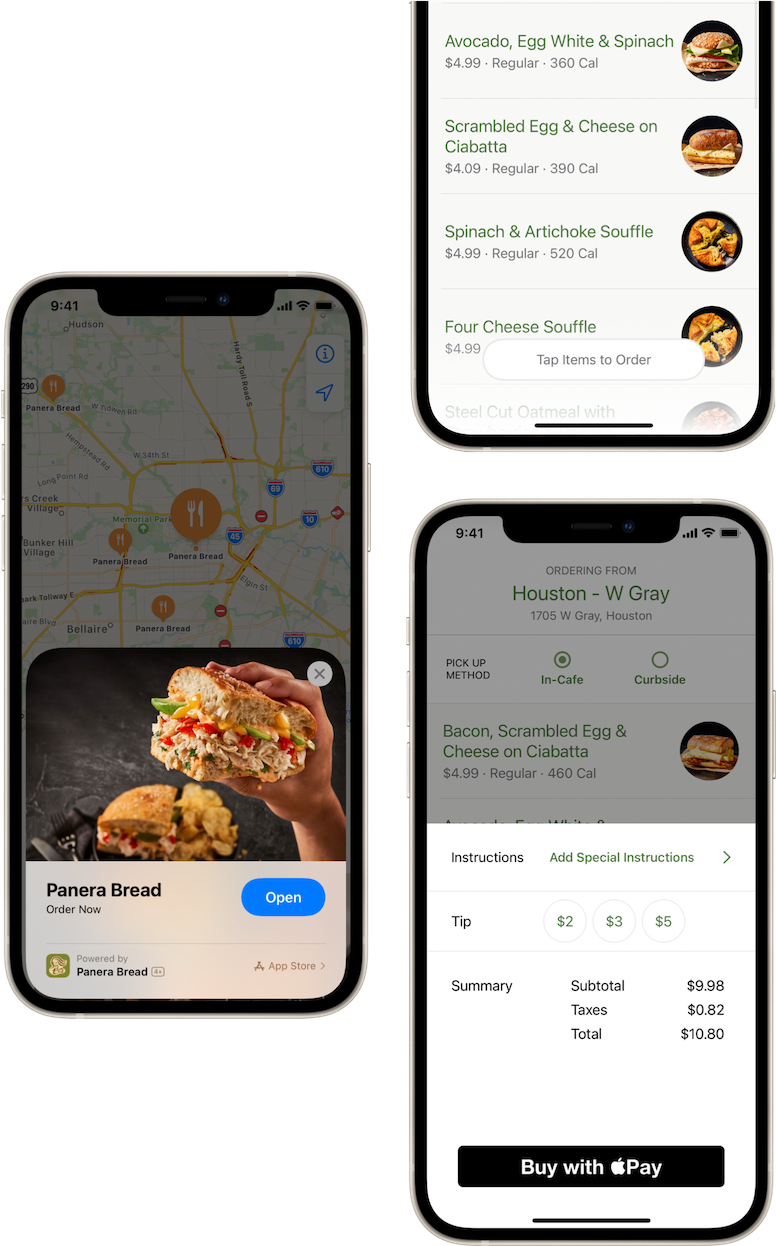
This strategy is effective for restaurants of any type, from fast-casual joints like Panera Bread, to sit-down experiences at bars and restaurants with App Clip codes at each table.
Services
Mobility company Spin turns everyone’s iPhones into universal scooter keys with their App Clips implementation.
By scanning the QR code on a Spin scooter, customers looking for a quick ride can instantly launch Spin’s App Clip, allowing them to unlock the scooter and hit the road. The ride can be paid for with Apple Pay, meaning no credit card entries or app downloads are ever required.
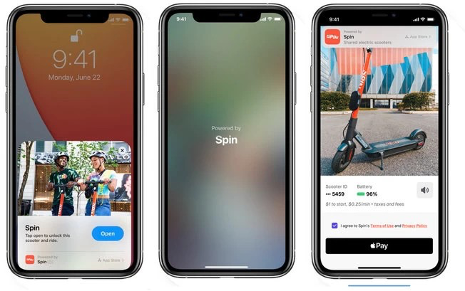
This furthers Spin’s vision of making personal mobility more accessible than ever, with first-timers or experienced riders being able to get started in seconds.
Ecommerce
Cozy Earth has gotten really cozy with the concept of using Reactiv Clips as part of their retargeting strategy.
With their strong Answer Engine Optimization (AEO) strategy, Cozy Earth is frequently recommended by LLMs like ChatGPT when users are looking for product recommendations. If a user clicks through the recommendation, a Reactiv Clip opens, allowing them to enter a fast, app-like shopping experience instantly. If a user clicks the link recommended by the LLM, a Reactiv Clip will open, allowing them to navigate the Cozy Earth app experience.
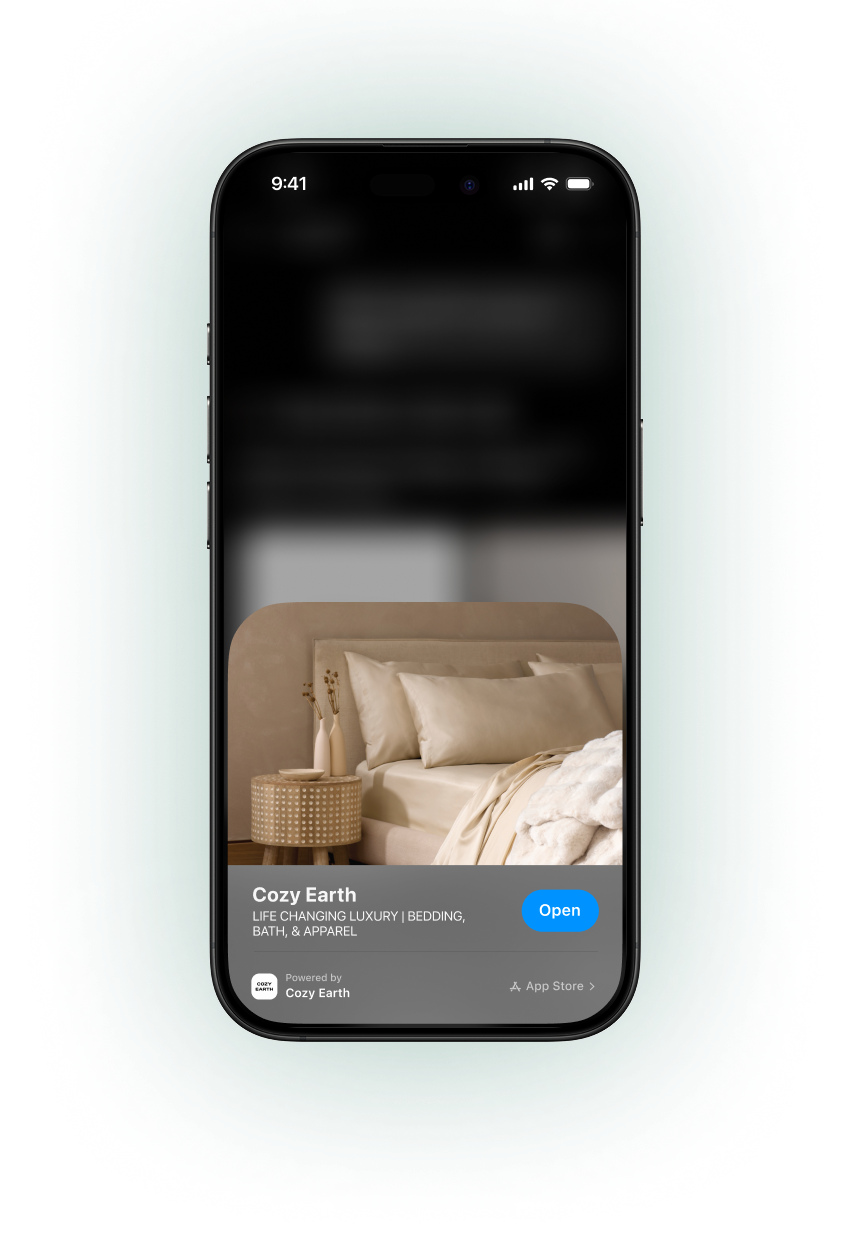
Because they opened a Reactiv Clip, they can now be targeted by push notifications for the next 8 hours.
This strategy creates a win for both the customer and for the business: the customer gets to navigate a fast, easy-to-navigate app experience, while the business now has a direct way to retarget the shopper for 8 hours if they abandon the session and/or their cart. With this combination of AEO and Reactiv Clips, retargeting has never been easier!
Hospitality
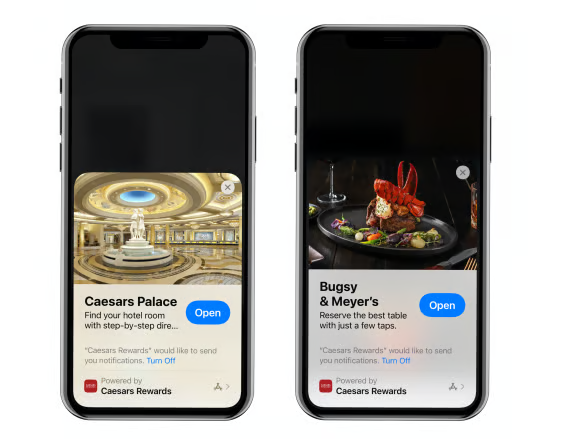
Caesars Entertainment took an early gamble on App Clips and it paid off, providing their customers with the comfort that only a smooth App Clip experience can offer.
Caesars integrated App Clips into their Las Vegas resorts, with various touchpoints to launch App Clips. Customers can get directions to their hotel room and other key areas and book restaurant reservations, while Caesars is able to then leverage system access to target them with push notifications.
Get started with App Clips
From biting pixels to bite-sized App Clips, mobile technology has come a long way since the days of Snake, and it’s important that brands don’t fall behind.
App Clips are one of the latest innovations, making things faster and smoother for customers while providing more flexibility for brands across all major B2C industries. These lightweight, native app experiences allow you to take full advantage of the mobile platform in ways static mobile webpages simply can’t.
And for ecommerce brands, Reactiv Clips take the concept even further, delivering product-first mobile experiences that introduce customers to your app without requiring an immediate download.
Whether you’re looking to fine-tune your App Clip experience or starting from square one, we’re here to help.



See Reactiv on your storefront.
Book a demo and we'll walk you through native apps and App Clips running on your Shopify store.