Get mobile commerce insights—no fluff, just what you need to build smarter.

App etiquette: do’s and don’ts of mobile apps in ecommerce

In 2024 the total time spent using retail apps blew past 100 billion hours globally and over three quarters of retail site visits in the US came from smartphones.
The takeaway? A strong mobile presence isn’t optional anymore—it’s critical. But having a mobile-friendly version of your website isn’t enough. To truly stand out, you need a seamless, thoughtful app experience.
Over my career in ecommerce—from early days at Shopify to leading sales at a mobile app builder, and now as co-founder of Reactiv—I’ve seen firsthand what separates a great mobile ecommerce experience from a forgettable one.
Working with some of the biggest brands in the industry has taught me not just what works, but also what to avoid entirely.
In this article, I’ll share the key “do’s and don’ts” of mobile ecommerce apps, offering actionable insights to help you launch an app that wows your customers and drives results.
Mobile commerce trends: being mobile-friendly is not enough
Customers have high expectations about their shopping experience on all devices. Having a mobile-friendly site is no longer enough. In fact, it’s now the bare minimum.
Customers not only prefer making purchases on dedicated mobile apps, but they’re more likely to purchase too: This year, the sales conversion rate of dedicated mobile apps was 3.5% vs 2% for mobile websites. Mobile apps also had an average cart abandonment rate of 20% vs 97% for mobile websites.
That is a staggering difference.
If you haven’t thought about developing an app for your ecommerce brand yet, now’s the time.
Building for success: the do’s of modern app building
Building an app can be confusing and overwhelming. I’m here to make it easy. Let’s start positive and explore the do’s, first.
Have a clear business strategy and outcome
While I just spent the first part of this article raving about mobile apps, it doesn’t mean you should immediately rush out and build.
When launching a mobile app for your brand, ask yourself:
- Why should a mobile app exist for my brand?
- What does it mean for my business?
- What does it mean for my customers?
When those answers are clear, the strategy for your app and the purpose it’ll serve for your customers will reveal itself. If your app doesn’t have a good use case, you’ll be fighting an uphill battle to drive customer adoption.
Work smarter, not harder, and build an app that serves a strong purpose for you, your business, and your customers.
Plan for long-term growth
Having a mobile app isn’t passive — it needs to be actively tied into marketing campaigns and treated as an important platform for your business. Growth must be fostered and re-engagement is crucial. Some questions to consider:
- How will you sustain incentives over time to maintain steady growth?
- How will your app marketing strategies organically tie into your planned marketing campaigns?
Regularly keep your app updated and optimized post-launch and ensure it’s compatible with new OS versions and devices. It’s also important to stay in compliance with both the App Store and Google Play Store rules. Follow each store’s guidelines for features like signing in with Apple/Google, account deletion, and subscription cancellation.
Your app should be an important part of your marketing and business efforts moving forward — ensure it gets the attention it deserves.
Prioritize re-engagement strategies
Two questions:
- What are the incentives for customers to download your app vs just using your mobile site?
- What are the incentives for customers to re-visit your app?
Having a re-engagement strategy can help answer those questions.
I recommend incentivizing app downloads and repeat visits with in-app offers for new customers and loyalty rewards for repeat users.
But here’s the catch: not every shopper is ready to commit to downloading your app. This is where Reactiv Clips shine.
Reactiv Clips are lightweight, instant app experiences that deliver the full functionality of a mobile app without requiring a download. Think of them as mini-apps that shoppers can access directly from a link—whether in an email, SMS, or ad—or by scanning a QR code.
These clips create an effortless way for shoppers to interact with your brand, browse products, and even complete purchases—all without leaving their browsers.
Once a shopper interacts with a Reactiv Clip, it opens up a unique opportunity: an 8-hour window where you can send personalized push notifications without needing them to opt in. These notifications let you instantly re-engage users with tailored messages like abandoned cart reminders, exclusive offers, or product recommendations.
It’s simple: an app can only drive revenue if customers keep coming back. Give them a reason to. Reactiv Clips give you a seamless, innovative way to make that happen.
Ensure your app reflects your brand
You’ve already built and cultivated a brand, so it only makes sense to continue that with your app experience.
While it can be tempting to use an app to try creative new looks and approaches to your brand and take advantage of the medium, businesses with consistent brands see 33% higher revenue and 20% higher overall growth when compared to brands with off-brand content.
Don’t shape your brand to a mobile experience, shape your mobile experience to your brand.
Leverage integrations
Take advantage of your marketing stack!
Leverage integrations to provide features like live chat and product reviews to enhance customer engagement while simultaneously improving the customer experience.
If you’re looking to build your app with Reactiv, we provide many integration options, such as Klayvio for email and SMS marketing and GA4, so you can have consistent, relevant analytics across all platforms.
Your app shouldn’t be siloed away from the rest of your marketing stack. Leverage integrations to enhance the app experience for both you and your customers.
Craft intuitive user journeys
I can’t tell you how many apps I’ve uninstalled because they’re immediately challenging to navigate.
UX is as important on an app as it is on a website. Craft intuitive user journeys to provide a smooth shopping experience that is built to foster conversions.
As Al Doan, founder of Missouri Star Quilt Company shared:
“On the website, it can be like Times Square. Pick your poison. Here’s our billboard—we're going to put this all up here, and you guys find what you want. On an app, you pick the thing you want people to click on and give them two or three options in there. You're trying to get them into a journey that's customized for them.”
Keep the app’s home screen organized and uncluttered, and tailor the shopping experience with tools like featured collections and promo banners.
Focus on the desired user journey from opening the app to conversion and keep it obstacle-free while promoting intuitive discovery.
Optimize your app for performance
Customer experience is paramount to app retention after the initial use. Avoid frustrating customers by ensuring your app is optimized, especially after new firmware releases.
Focus on usability and ensure your app has fast response times, smooth scrolling, and seamless navigation to provide a strong customer experience and encourage repeat use.
Apple has specific rules targeting some usability features as well that you’ll need to follow to avoid getting delisted. These include:
- Styling and placement of Sign-in with Apple and Apple Pay features
- Making it reasonably easy for customers to delete their accounts
- Selling of digital content (ebooks, music, movies, subscriptions)
Customers don’t have to use your app, so they need to want to. Make sure it’s optimized and responsive at all times so they’re encouraged to re-engage.
Incorporate express payment methods
Did you know you can improve conversion rates by 10 - 15% with an optimized payment process?
Apps are about convenience and providing a simple experience for your customers. Incorporating express payment methods like Shop Pay, Google Pay, and Apple Pay can significantly help with this.
Reduce friction and avoid overcomplicating the sale — use express payment methods to avoid customers dropping due to a convoluted payment process.
Modern app building: the don’ts
Now you know what makes a strong mobile app. Before you build yours, I want to highlight a few common mistakes I notice from brands as well. Avoid these pitfalls, and you’re golden!
Don’t neglect analytics
There’s nothing more disheartening than realizing your analytics haven’t been tracking properly.
Don’t miss out on valuable data — test your integrations like Klayvio and GA4 early to ensure reliable data collection.
Analytics aren’t just a way to track conversions. Insights into how your customers use your app can provide valuable data, and you don’t want to miss out on learning that early.
Don’t ignore customer feedback
Your customers are the key to your app’s success or failure, so it’s important to monitor customer feedback.
Reviews on the App Store and Google Play Store are a great way to do this, as well as keeping an eye on feedback shared on social media.
Don’t chase feature parity with your website
This is one of the biggest mistakes I see from brands.
Your app is its own distinct entity. Don’t make it a carbon copy of your website—otherwise, what’s the point?
While both are built to drive conversions, customers use apps and websites differently, and the customer experience should reflect that. Instead of replicating your website, focus on optimizing for the unique possibilities of mobile shopping: clear visuals, functional linking, and value-added features that go beyond what your site can offer.
Take Med School Bro, for example. This education-focused ecommerce brand recognized that its mobile-first audience—pre-med and med students—needed more than just a website to access its resources. By launching a mobile app with Reactiv, they created a deeply personalized experience tailored to their customers' academic journeys.
The Med School Bro app offers features that aren’t possible on a traditional website, like:
- Daily quizzes and weekly trivia: These features allow students to test their knowledge on the go, keeping them engaged outside of traditional study methods.
- Hyper-personalized product recommendations: By analyzing quiz results and in-app behavior, the brand can deliver tailored offers, such as discounts on specific study guides, that directly address customer needs.
- Push notifications without opt-ins: Reactiv App Clips enable Med School Bro to reach users without requiring a download or opt-in. For example, they can send reminders for abandoned carts or personalized offers, bridging the gap between browsing and purchase.
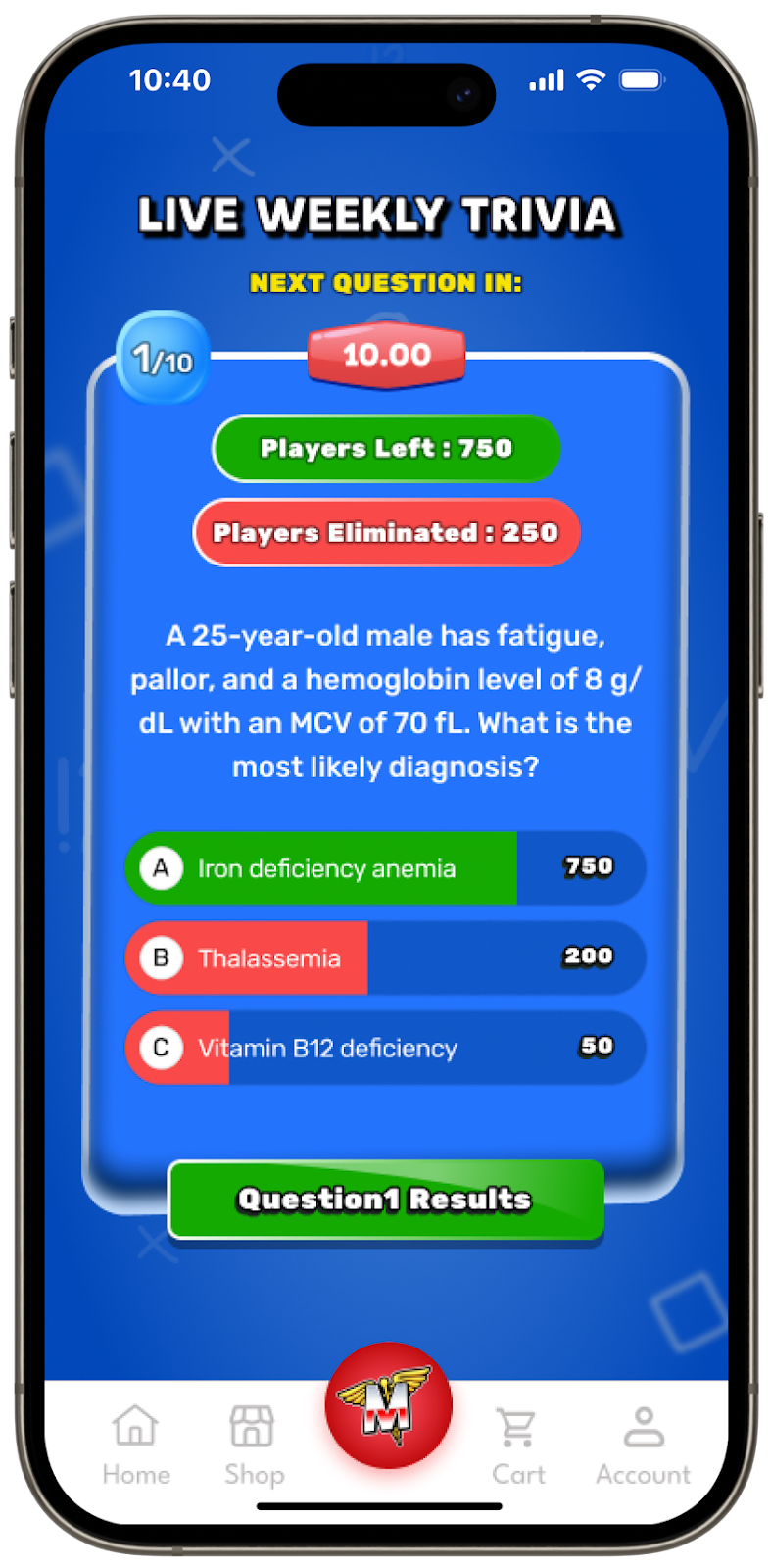
Brandon Portnoff, Co-Founder of Med School Bro, sums it up: “Our mobile app lets us be with customers throughout their entire journey. It gives us access to valuable data and enables us to engage them with timely, relevant messaging in ways we simply couldn’t on our website.”
By leveraging the unique capabilities of a mobile app, Med School Bro turned its app into a tool for retention, engagement, and conversion—not just an extension of its website.
Don’t overuse push notifications
Customers opt-in for information, not to be annoyed.
Push notifications can be a great marketing tool, but are easily overused. Use them strategically and sparingly to gently remind customers to return with lost cart reminders and exclusive offers.
88% of users are more likely to engage with an app after 90 days if they’ve opted in to push notifications, so if customers have opted in they are ready and willing to engage. That being said, more than 50% of customers think that push notifications are annoying, and 37% of people would mute an app that sends more than 2 push notifications a week. You need to tread carefully.
Use push notifications to your advantage to re-engage customers, but don’t overuse and drive them away.
Don’t reinvent the wheel
Mobile app conventions exist for a reason. Users want a familiar experience that just works.
As I mentioned earlier, you want to style the app to match your brand to avoid confusing customers. Despite this, it’s okay to make tweaks to ensure you’re using native UX conventions that customers already know. This way, they’ll feel like pros right away.
A simple in-app experience will drive more conversions than a convoluted one.
Don’t gate the experience behind a sign-up wall
35% of customers use a brand’s app because of convenience, and nothing is more inconvenient than a forced login. It may lead to more abandonment and even app rejection from app stores.
Instead, let customers browse without logging in and make it easy to remain signed in once they’ve created an account.
Reactiv Clips is a great tool for a lightning-fast, sign-in-free app experience. Learn more about Reactiv Clips here.
Make it easier for customers to immediately start browsing your app to increase customer retention and reduce checkout friction.
Don’t overlook incentives for app adoption
Brand loyalty alone won’t drive app downloads.
You might get your diehards, but once they download, growth isn’t going to come on its own. To encourage continuous app adoption, incentives are a great option.
Here are a few proven strategies to drive app downloads and keep users engaged:
- Exclusive Discounts: Offer app-only discounts or flash sales that reward users for downloading and shopping through your app. For example, “Get 15% off your first app purchase!”
- Early Access: Give app users first dibs on new product launches or sales. Knowing they’ll have early access can encourage fans to download and engage.
- Loyalty Rewards: Enhance your loyalty program with app-exclusive perks, like bonus points or rewards for in-app purchases.
- Gamified Experiences: Use interactive features like daily quizzes, spin-to-win games, or challenges that can only be accessed through the app to make it fun and rewarding for customers to engage.
- Seamless Order Tracking: Encourage downloads post-purchase by offering app-only order tracking with instant updates and push notifications—no lost emails in inboxes.
- Personalized Recommendations: Use in-app behavior to provide tailored product suggestions or offers that feel unique to the customer.
By offering tangible benefits like exclusive discounts, you can grow the customer base of both your app and your brand as a whole.
Don’t rely on app store paid ads
Take it from me: app store ads can work, but they’re just not great for commerce apps.
Don’t get me wrong, they’re great for games and productivity apps. But if you’re trying to promote your ecommerce app, they don’t have much of an impact, and your advertising budget is better spent elsewhere.
Instead, maximize your downloads by seamlessly integrating your app messaging into your existing campaign messaging.
Technical essentials: the do’s and don’ts for app development
Hopefully, my list of the do’s and don’ts has made you feel more confident dipping your toes into the world of ecommerce apps. But there’s still a little more ground to cover!
The technical aspect of app building is often intimidating for businesses looking to get into the app game for the first time. To help set you on the right track, I’ve compiled a small list of technical do’s and don’ts.
Get your tech hat on and read on!
Technical app building do’s
- Adopt a modular approach - break down components into reusable, maintainable reusable parts. This also allows you to keep presentation components separate from business logic, providing better scalability for your app.
- Optimize performance - consistently optimize your app for performance and take measures to make sure it’s lightning-fast. Use optimized libraries like react-native-fast-image and performance boosters such as React.memo and useMemo to keep things nice and speedy.
- Prioritize cross-platform compatibility - the days of platform wars are long over! Performance should be strong on all devices. Ensure your in-app experience is smooth on both iOS and Android.
- Conduct rigorous testing - test rigorously and constantly leading up to launch. Include comprehensive testing for usability, security, and platform-specific functionality to ensure everything is running nicely under the hood.
- Focus on accessibility - accessibility is becoming more important than ever, and rightfully so. Focus on usability and accessibility so anyone who wants to use your app can use it. Implement accessibility features wherever possible and test your app with a screen reader to ensure inclusivity.
Technical app building don’ts
- Don’t overuse complex state management - simplicity is not only key for your customers, but your back-end as well. Avoid libraries like Redux unless necessary. Use simpler tools like React Context to reduce overhead.
- Don’t neglect performance for long lists - replace ScrollView and instead use an optimized FlatList or SectionList. This will keep things moving smoothly as customers explore your app.
- Don’t hardcode font sizes - let your customers control how they view content while ensuring everything always displays properly on any screen. Use responsive libraries so you can adjust to user preferences.
- Don’t rely heavily on third-party libraries - avoid unnecessary dependencies that could bloat the app or introduce bugs. Keep things in-house as much as possible.
One more “do”: build your app with Reactiv
I’m confident if you follow these do’s and don’ts, you can build a successful ecommerce app regardless of how you build it. But my recommendation to maximize success? Reactiv.
Yes, I’m recommending the platform I co-founded, but it’s because we built it with these DO’s and DON’T’s in mind from the beginning.
While the mobile app experience is crucial and irreplaceable, apps themselves are expensive, slow to build, and force customers to download before they can engage. Even when your app is released, scaling your mobile strategy can feel impossible.
Traditional apps are riddled with friction — slow downloads, low conversions, and no way to reconnect with shoppers who skip push notifications.
Most people think this is the unavoidable reality of building an app, but Reactiv circumvents all of this.
Reactiv lets you launch lightweight, fully-featured custom mobile experiences that convert faster, retarget ad clicks for free and engage shoppers instantly — no opt-ins or downloads needed.
With Reactiv, you can:
- Build and customize your app with modular React components that adapt to your needs
- Retarget every ad click through Reactiv Clips and build apps that convert without technical bottlenecks
- Customize your app to add unique pages and improve your brand experience.
- Launch an app faster and make updates at warp-speed.
Why should you constantly have to choose between speed or quality? We want you to choose both, and Reactiv can make that possible. Get started here.
Other Similar Blogs
.png)
6 Benefits of Mobile Commerce You Can’t Ignore in 2026
In 2026, it feels like we’re always on.
Recent data show Americans check their phones 186 times a day, with 72% using them at work and over 84% checking within 10 minutes of waking. This is having a noticeable impact on web usage worldwide: 65% of global online traffic now comes from mobile devices.
This shift has fundamentally changed humans’ shopping behavior. Customers are shopping while commuting, scrolling social media, standing in line, or walking past a storefront and thinking, “Oh yeah, I meant to check that out.”
If you can bring your phone there, you can shop there.
As mobile becomes the dominant platform, brands that prioritize it are gaining meaningful advantages across:
- Conversion
- Engagement
- Customer lifetime value
Want to be one of those brands reaping the benefits of mobile commerce (also known as mcommerce)? We’re here to help.
What is mobile commerce?
Before we explore the benefits of mobile commerce, it’s important to define it: any transaction conducted on a mobile device (such as a smartphone or tablet).
It can take place through:
- Native mobile apps
- Mobile-optimized websites
- Digital wallets/mobile payments (Shop Pay, Apple Pay, Google Pay)
- Social commerce platforms (Instagram, TikTok, Pinterest)
- QR code and NFC-triggered experiences
- Conversational interfaces (AI chatbots, conversational commerce)
76% of adults have made purchases on their mobile phones, and mobile phone sales are forecast to reach approximately $856 billion in 2027.
But despite mobile’s ubiquity, its conversion rates aren’t scaling at the same pace: 2025 ecommerce conversion rates benchmarked at 4.8% on desktop vs. 2.9% on mobile.
So, why the divide? For many brands, it’s because their mobile customer experiences simply aren’t keeping up.
Mcommerce requires a dedicated marketing strategy that accounts for the different behaviour synonymous with the platform, like shorter sessions, higher intent, and a lower tolerance for friction.
It also works best when brands design their mobile experience around the channel’s advantages instead of just rebuilding their desktop site in portrait mode. You have to understand and hone in on the benefits of the platform and tailor your experience toward them.
6 benefits of mobile commerce you can’t ignore
Below, we’ve highlighted six key advantages of mcommerce and how you can implement them as part of your app conversion optimization strategy.
1. Convenience makes the path to purchase easier
Everyone’s on their phones. A lot.
That level of convenience is impossible to beat when compared to other sales channels. Theoretically, people always have the ability to make a purchase, whether it’s during their commute, on a coffee break, or while lying in bed.
With Americans spending 4.5 hours on their phones each day, mobile has become the most natural channel for impulse purchases, repeat purchases, and subscription renewals.
Maev, a premium dog food brand, has built an mcommerce strategy that’s as exciting for us as their food is for dogs. They’ve optimized every part of their mobile shopping experience for convenience:

As soon as shoppers land on the site, they’re shown a best-selling product with a perfectly placed CTA to shop now. After clicking, they’re taken to the product page, where another well-placed CTA prompts them to add to cart.
For pet owners all-too familiar with the sudden “I think we're almost out of food!” panic, Maev makes it impossibly easy for its customer base to restock.

2. Faster checkout boosts mobile conversion rates
Check your phone right now (or, if you’re reading this on your phone, pull down your notification bar). You probably have at least one notification.
No, we’re not secretly tracking your phone. It’s just an educated guess, considering the average smartphone user in the US gets 46 app push notifications per day.
With that much noise competing for attention, you only have a small window of time to convert before shoppers get distracted and move on. You actually only have 3 seconds – 53% of mobile site visitors will bounce if a page takes more than 3 seconds to load.
People move fast on mobile, and your site needs to keep up. That’s why optimizing for speed is one of the best ways to drive sales on mobile.
Reducing friction wherever possible is essential, especially by:
- Offering one-tap checkout options: like Shop Pay, PayPal, Apple Pay, and Google Pay
- Saving customer information, such as addresses and payment details, to speed up repeat purchases
- Reducing the steps between product discovery and checkout, to speed up the checkout process and minimize opportunities to bounce
Integrating digital wallets into your site addresses all of these, and it’s becoming the norm. 4.5 billion people used digital/mobile wallets to pay in 2025, and Shopify data shows that Shop Pay can increase conversions by over 50% compared with guest checkout.
By pairing these strategies with push notifications, mobile apps, and SMS nudges, purchasing can become as easy as tapping a button.
Obvi obviously knows what they’re doing when it comes to providing a lightning-fast mobile checkout experience. Customers can purchase a one-time order or subscription and pay directly on the product page – no checkout required.

For those who do enter checkout, Obvi still keeps things speedy with multiple one-tap payment options and a simple three-step checkout flow.
When it comes to discovery to purchase speed, you obvi can’t get much faster than this.

3. Mobile commerce powers social commerce purchases
The lines between social commerce and mcommerce are blurred.
64% of the global population uses social media, and 99% of social media users are accessing their platform(s) of choice on a smartphone – most people aren’t browsing TikTok from their desktop. Because of this, platforms like Instagram, Pinterest, and TikTok are built for mobile-first consumption.
While these apps are nothing new, the way people are using them is changing, with an increasing focus on commerce. 52% of American consumers have made at least one purchase on a social media platform, and 34% of 18-34 year olds are making weekly purchases.
It’s safe to say social platforms are mcommerce platforms.
These numbers aren’t surprising, because social commerce makes buying almost as easy as scrolling, by:
- Reducing friction between discovery and checkout
- Supporting impulse purchases from creator-led content
- Allowing users to buy without switching devices – or even apps
4. Personalized push notification retargeting through Reactiv Clips
Sometimes customers just need a little push… from a push notification, of course.
Push notifications allow brands to re-engage shoppers instantly while purchase intent is still high. With an open rate of 50% versus email’s 20%, push notifications are a strong way to directly reach potential customers and get their attention.
In the past, a major disadvantage of push notifications was that shoppers needed to have your app installed. But with Reactiv Clips, that barrier disappears.
Brands can send timely push notifications to customers who clicked on their ads – no install or opt-in required. The benefits of this speak for themselves. The average Reactiv Clips user sees:
- 60% open rates on personalized pushes
- 5-7% conversion rates
- Up to 400% more engagement compared to untargeted marketing campaigns
Push notifications can also be tailored even further through geolocation triggers, NFC taps, and QR codes. For example:
- A shopper walking past your store can receive a Siri prompt to explore your popular products
- Fans at a stadium can buy a jersey instantly from their phone without having to download any apps
- A nearby coffee lover can receive a notification to skip the line and order ahead from your café
Push notifications offer a powerful, mobile-native way to recover abandoned carts, send product reminders, and promote limited-time mobile commerce offers.
Cozy Earth knows a thing or two about it. Using tailored push notifications, they retarget shoppers who browsed a product but didn’t add it to their cart. When clicked, the notification opens an app-like experience in Reactiv Clips, then returns them to the product page to complete the purchase.
Instead of sending an abandoned cart email into the ether, Cozy Earth can re-market to customers in a more noticeable, engaging fashion wherever they are (maybe even in bed…).

5. Mobile apps are more than a shopping channel
A common misconception about mobile commerce is that apps are nothing more than mobile storefronts. But they can be so much more.
To get the most out of mcommerce, you need to optimize for more than just conversions – you need to optimize for connection.
Over 76% of customers say they’d choose to buy from a brand they feel connected to over a competitor, and 57% say they’ll spend more with a brand when they feel connected to it. Your app is the perfect vessel for this connection.
Apps allow brands to create fully-owned digital environments where they can:
- Build communities for customers to engage and interact with each other
- Offer app-exclusive products or early access opportunities
- Run quizzes, surveys, or product feedback initiatives
- Deliver educational or tutorial content
Missouri Star Quilt Company has stitched together a mobile community that demonstrates how apps can go far beyond shopping. By launching an app with Reactiv, they created a space for tutorials, daily deals, curated journeys, and community-driven content.
This customer-first design drove 50,000 mobile users in two weeks and led the app to generate 10% of total revenue.
Through this initiative, Missouri Star Quilt Company’s app has now become a hub for brand loyalty, education, and collaboration – deepening customer engagement while increasing lifetime value.

6. Seamless online-to-offline commerce
Shopping can’t be distinguished as “online” and “offline” anymore – everything has essentially become omnichannel.
Mcommerce connects in-person physical and online shopping experiences so customers can seamlessly shop across multiple channels. For example, a customer might see a pair of shoes in a store window, visit the brand’s Instagram page later, then go to their website and download the app to purchase the shoes. Afterwards, if it turns out they got the wrong size, they return them in-store, accessing their receipt directly from the app.
This isn’t an unrealistic scenario created to prove a point; it's real life: 73% of consumers use multiple channels throughout their shopping journey. Your storefront, app, and other digital touchpoints need to work together, not in silos.
A true omnichannel experience means that no matter where a customer makes a purchase, their purchase history, preferences, and loyalty status are all stored in one place – the app.
Some brands even let customers check out directly from their phones via QR codes on packaging for instant reorders or in-store signage that launches mobile checkout.
With Reactiv Clips’ retail touchpoints, there are even more ways to seamlessly connect physical, mobile, and digital retail, including:
- Capturing the attention of nearby shoppers: Geofence physical locations and automatically display Clips on a shopper’s phone through Siri Suggestions. If they open it, they’ll become a retargetable customer.
- Including QR codes on shelves and product tags: QR codes allow customers to instantly access sizing guides, ingredient details, stock availability, and more.
- Converting retail customers to digital ones directly in-store: Shoppers can join your loyalty program, opt in to restock alerts, and be notified of limited-time in-store offers – directly from an aisle in your store.
- Booking 1:1 experiences: Customers can be prompted in-store to book personalized appointments and experiences on their phone.
- Empowering staff to provide a richer experience: Staff can instantly demo complex products, share comparison charts, and highlight add-ons/bundles
Single-channel shopping is dead – and customers are craving convenience.
Start experiencing the benefits of mobile commerce with Reactiv
With Reactiv, you have access to everything you need to build an effortless, engaging, and high-converting mobile commerce user experience.
To recap some of the benefits:
- Unparalleled convenience makes buying easier than ever
- One-tap checkouts and mobile wallets allow purchases to happen at supersonic speeds
- Custom mobile apps let you showcase app-exclusive drops, run quizzes, and provide educational/tutorial content – all while gathering first-party personalization data
- Personalized push notifications help you break through the email inbox noise and re-engage customers anywhere, anytime
- Apps that function as more than just a storefront allow you to build an engaged community surrounding your brand
- Geolocation targeting, NFC taps, and QR code integrations seamlessly connect online and offline shopping and sync up loyalty programs, wishlists, and purchase history
Mcommerce is the future, so don’t treat it like an afterthought. With Reactiv, your brand can turn every mobile interaction into a conversion opportunity, build stronger customer relationships, and unlock the full potential of mcommerce.
Interested? Book a demo today and let’s get started.

Mobile Apps Need SEO Too. Here’s What You’re Missing
In an increasingly crowded app ecosystem, standing out takes more than just a good product. And with search engines indexing more app content than ever, Mobile App SEO is no longer optional.
Where to start? Right here, your crash course in boosting mobile app visibility.
App Store Optimization (ASO): What is it and why should you care?
When discussing app store optimization (ASO), we’re talking about the process of improving your app’s visibility and ranking in app stores like Google Play and Apple App Store. Think of it as mobile app SEO—like SEO for websites, but designed specifically for app stores.
And this is why you want to know this: In 2025, app stores are the top channel for app discovery. Apple’s June 2025 App Transparency Report showed that over 50% of app downloads come from organic search within the app store. Without ASO, even the best apps stay invisible.
Just like your website—or any marketing channel for that matter—great content isn’t enough anymore. It’s all about distributing your content and helping customers discover you. And with ASO, you’ll see the benefits take the form of:
- More organic downloads. Which means more potential customers to retarget
- Lower customer acquisition costs. You can scale back ad spend
- Stronger brand presence. Especially where it counts like on your digital channels
- Higher retention. The app reaches users who are actually looking for what your app offers, leading to improvements in your mobile CRO
Want to know more about mobile CRO? Read more here.
ASO factors you can control to climb the ranks
Alright, now we know why ASO matters. On to the more important part—how does it actually work?
While there is always some mysterious, black-box element to algorithms, there are several elements you can control to improve your app’s ranking in various app stores. Here are some tactics to be aware of:
- App name and subtitles. Keep it descriptive and brief
- Icons. Typically, your store logo
- Ratings and reviews. Social proof from other customers
- App preview and screenshots. Give users a taste of what they can expect once they download
- App description. Explain what users can find in the app (i.e. loyalty programs, exclusive discounts, memberships, etc…)
App updates. Shows users that you’re actively investing in the UX

7 steps to improve your app store optimization
To rank higher in the app store, here seven considerations you can’t ignore:
1. Nail your keyword and user intent research
ASO starts with understanding your relevance. Why? Because sometimes you don’t know what you’re looking for until you find it. The same is true in the app store.
According to AppTweak, 65% of all App Store downloads are triggered by searches of generic terms, meaning keyword optimization is vital. Here is are ways to go about this:
- Utilize keyword research tools. Find those specifically designed for app stores like AppTweak, Sensor Tower, and App Radar. Discover high-volume, relevant keywords.
- Prioritize highly targeted keywords.In the age of Chat-GPT, the way users search is changing. That’s why prioritizing long-tail, intent-based keywords is a great way to attract meaningful traffic that is more likely to convert. For instance, you may want to rank for “waterproof dainty gold jewelry” instead of “gold jewelry” to attract the right shoppers.
- Continuously refresh your keywords. Things change quickly. Because of that, it’s best practice to update your keywords on an ongoing basis. App Radar recommends updating your ASO strategies every 1-2 months (6-8 weeks for Google Play Store and every 4 weeks for Apple App Store
- Quality over quantity. More keywords does not equal better rankings. This veers into spammy, keyword stuffing, which not only makes for a poor experience but also hurts your ranking in the algorithm.
2. Optimize metadata (title, subtitle, & description)
Metadata is a major ranking lever. In 2025, ASO experts emphasize that metadata—especially titles and subtitles—remain the primary way app stores assess relevance.
Metadata is one of the most important places to apply that keyword research you did. Include top-performing keywords in your title:
- Apple App Store. You get 30 characters for your title and another 30 for your subtitle. Make them both count by using various keywords.
- Example. Add your primary keyword next to your brand name in the title and focus your subtitle on your main benefit, with a secondary keyword
3. Boost visual appeal & storytelling in your listing
Visual elements dramatically affect conversion. For example, think of all the places your app’s icon appears: app store listings, users’ home screens, phone settings, and more. It’s your visual identity so it needs to represent your brand and mobile experience effectively.
Recent studies indicate that optimizing your app's visual assets, like user ratings, screenshots, and videos, affects conversions, not just rankings. Here are ways you can do this:
- Stay on brand. Ensure your app icon is visually compelling and on-brand.
- Use high-quality screenshots. Use screenshots that showcase your app's core features and benefits (for instance, product collections, checkout pages, community forums, member-only offers, and more).
- Test your screenshots. Both Google and Apple let you A/B test screenshots. For example, create cohesiveness with your screenshots to tell your brand narrative, visually.

Something to note: Apps with a preview video see a 20% to 40% higher conversion rate than those with screenshots alone. Including a short, engaging preview video can provide users with a clear understanding of your app's functionality and user experience.
4. Prioritize ratings and review management
Bottom line: your app store reviews could be the make-or-break factor on whether someone downloads or bounces.
Research shows that 50% of mobile app users won’t download an app with a 3-star rating. That climbs to 85% when it’s a 2-star rating. And we’re not just talking about a few users—77% of mobile app users read at least one review before downloading a free or paid app.
While you can’t directly impact your reviews and ratings, there are strategies to encourage your app users to help you influence this factor:
- Prompt feedback. Encourage feedback from consumers post positive interactions.
- Respond to reviews. Showing gratitude and resolution matter and signal to other potential customers that you care about your community’s feedback

- Monitor sentiment trends. Use recurring themes to improve the product, listing, description, or UX.
5. Boost retention and engagement signals
Getting users to convert and download your app is step one. But in 2025, app stores reward apps that keep users active.
Higher retention signals to Apple and Google that your app provides value, improving ranking. On average, only 21% of users return to an app within the first 24 hours, dropping to 7.5% by day 10 and just 1.89% by day 90.
What this means is that if you can keep users to return (even just on day two), you’re already ahead of the competition. Here is how you can get users to come back:
- Make it easy. Simplify onboarding flows to reduce drop-offs.
- Make it personal. Use personalized push notifications to re-engage lapsed users.
- Make it trackable. Track key retention metrics (Day 1, Day 7, Day 30) to assess performance
- Make it desirable. Employ loyalty or gamified features to keep users returning

6. Localize to go global
If you ship to international markets, your app should reflect that. And localizing your app can help you break into new markets. Industry knowledge shows that 80% of top-grossing app markets speak languages other than English.
And studies show that apps that localize metadata and visuals see up to 128% more downloads in targeted countries. You can take advantage of this, here’s how:
- Translations. Translate app titles, subtitles, and descriptions into target languages or spellings. For example, UK English/Canadian English vs. US English. Or term differences based on local slang.
- Visual adaptations. Adjust visual elements (screenshots, videos) for cultural resonance
- Localize keywords. Optimize keywords per locale using localized keyword research tools.
7. Continuously test, iterate & monitor ASO performance
Algorithms, user search behavior, and app store ranking factors are constantly changing, especially in the age of AI. A winning ASO strategy is not a set it and forget it one—when technology changes so should your ASO.
Stay dynamic to continuously adapt to an ever-changing landscape:
- Google Play testing. Use Google Play’s built-in A/B testing and replicate via segmented testing on iOS
- Track performance. Track metrics like keyword and category rankings, install conversions, and retention week over week
- Stay in the loop. Adapt to new app store features—like Apple’s Custom Product Pages (CPPs) with deep linking, and Google Play’s Custom Store Listings (CSLs)—to boost targeting and conversions
- Consistently refresh. Seasonally update your approach to align with holidays, trends, or cultural moments.
Boost your app rankings with Reactiv
Remember: app store optimization drives installs—but ranking isn’t enough if users churn quickly.
By using Reactiv, you can improve your ASO while minimizing churn by:
- Engaging users instantly via Reactiv Clips (boosting retention signals that stores reward).
- Personalizing onboarding and push notifications (i.e., asking for app store reviews a couple of days after downloads, and sending push notifications with personalized offers for dormant customers)
- Running A/B tests on landing pages and campaigns that directly support ASO
Now that you know about us, we want to know more about your business. Book a Reactiv Clips demo today.

Everything You Need to Know About App Conversion Optimization
App conversion optimization is the process of improving your mobile app’s ability to turn users into engaged customers. Whether your goal is getting users to sign up, make a purchase, or engage with key features like quizzes, every interaction in your app contributes to your app conversion rate.
In 2025, users expect apps that are intuitive, personalized, and responsive. Avoid a poorly optimized app that risks losing users before they complete any meaningful actions.
How? Let’s break it down.
What is mobile app conversion optimization?
Mobile app conversion is the percentage of your users that took a desired action on your mobile app.
Your brain probably jumps straight to making a purchase, but it also includes signing up for an account, starting a subscription, applying a mobile-only discount code, commenting in a community forum, or making a repeat purchase.
To optimize your mobile app conversion rates, you first need to set clear goals. What action are you trying to encourage? Your baseline? Desired conversion rate?
The higher your conversion rate, the better you are at turning downloads and traffic into actual business results. The conversion rate signals clear messaging, lowers your cost of acquisition, and reaffirms that users are finding value in your app experience.
Key conversion rates to measure in 2025
Yes, closing a sale is definitely one of the most important macro conversions, it’s not the only mobile app conversion that’s worth measuring.
For your information, other conversions rates to track are:
- Website-to-mobile app conversion rate. This number shows how many of your store visitors downloaded your app
- Onboarding completion rate. Describes how many users finish the introductory flow of your ecommerce shop, like creating an account.
- First purchase rate. This shows how many new users buy within X days, based on your average time to purchase data.
- Cart abandonment rate. This number describes how many add products in the app but fail to check out.
- Retention-driven conversions. Describes repeat in-app purchases or renewals.
Once you collect the numbers, you can compare conversion rates to your other sales channels to gauge your app’s performance.
A 7-step checklist for optimizing your app conversion rates
Now you're ready for the big step: actually implementing CRO best practices to make sure shoppers install and engage with your mobile app. Here are seven recommendations that will make a big difference:
Optimize the path to download and onboarding
The first conversion rate you need to optimize is your app download rate. If you don’t have any users, you’ll have nothing else to optimize — that’s why starting the download and onboarding flow is a natural first step.
First impressions are everything, as 57% of users will only use an app once or twice before deciding to delete it or not.
The goal at this stage is to reduce friction, engage users immediately, and drive first-time conversions. Here are some helpful tactics:
- Simplify account creation. Offer social login (Google, Apple, Facebook), minimal fields, and guest browsing.
- Highlight your value proposition upfront: Communicate the “what’s in it for me?” before showing features. Let users know what differentiates your app from others, whether its community forums, loyalty programs, in-app promos, and more.
- Personalized onboarding: Collect zero-party data by asking customers their preferences for styles, categories, or collections so you can tailor the mobile experience.
- Track, test, iterate: Monitor drop-offs at every onboarding step and A/B test sequences.
Prioritize great UX and mobile app navigation
If your app feels clunky, no optimization hack will save it.
Every second of frustration leads to churn, and there are a lot of things that might frustrate customers in an app—slow load times, complicated navigation, and poor search capabilities.
Studies show that 70% of mobile users prefer apps with personalized UX, showing the increasing expectation for tailored experiences of users. Here is how you can do it:
- Keep navigation menus simple and visible. Let customers search and filter by product type, size, color, availability, etc…
- Ensure fast loading. Most users expect apps to load in less than 2 seconds and 40% of users will abandon it if load time hits 3 seconds.
- Reduce visual clutter. Each screen should drive toward one main action. For instance, homepages that guide users to a product category or product, product pages that drive users to add to cart, and a cart that drives users to checkout.
- Don’t reinvent the wheel. Users want an app that simplifies their life, not makes them learn an entire new interface. A usability study found that apps with intuitive, familiar navigations are 35% more likely to keep users engaged for longer periods of time.
Perfect your push notification and retargeting strategy
Once a user first interacts with your app, the next big challenge is keeping them engaged and recovering the sales they didn’t complete. Done right, retargeting app users with personalized push notifications is an essential strategy to capture this missed-out-on revenue.
Push notification marketing is a type of remarketing where brands send timely messages to users’ devices via desktop, mobile, or in-app notifications—whether part of a broader push notification ad network or standalone campaigns tied to engagement. This is how to do it successfully:
- Segment your audience. Group users by behavior (cart abandoners, browse abandoners, repeat buyers, inactive users) instead of blasting everyone with the same message.
- Abandoned cart nudges. Show the exact product left behind, add urgency, or sweeten the deal with free shipping.
- Browse abandon retargeting. Suggest similar items or highlight trending alternatives to what they viewed.
- Loyalty & lifecycle campaigns. Remind repeat customers about points, offer early access to new drops, or send personalized birthday promos.
- Personalize and time wisely. Include product images, shopper names, and send notifications during high-conversion windows like evenings or weekends.
- Control fatigue. Limit pushes to 2–3 per week, prioritizing high-intent triggers over generic sales blasts.
- Track and optimize. Measure open rates, CTRs, and recovered conversions. Continuously A/B test subject lines, creatives, and send times.
Want to learn more? Lucky for you, Reactiv covers the best practices for personalized push notifications here.
And we have more good news—sending push notifications just got a whole lot easier with Reactiv Clips.
Traditional retargeting can break down because shoppers don’t want to reopen—or worse, reinstall—an app. Reactiv Clips solve this friction. Reactiv Clips are lightweight versions of mobile apps that allow users to access a specific part of the app's functionality with no download required.
Here’s how Reactiv Clips retargeting works:
- A user sees an Instagram ad.
- The ad points to a Reactiv Clip.
- The user clicks the ad, which opens a Reactiv Clip product page. Then they abandon the page.
- You send a personalized push notification to that user
- The user can check-out in one-click through Apple Pay, Shop Pay, etc…
- You send a post-purchase notification for the user to download the full app

And when done well, they really work. The average user on Reactiv sees a 60% open rate on personalized pushes and a 5-7% conversion rate. Not to mention, they can receive up to 400% more engagement compared to untargeted campaigns.
A/B test in-app CTAs
If users don't notice or respond to your calls-to-action (CTAs), conversion opportunities slip away. But even small tweaks can drive meaningful gains!
Personalized CTAs convert 42% more visitors into leads than untargeted CTAs. This means that when building retargeting ads for different segments, you’ll want to strategically tailor your CTA to the relevant funnel stage like this:
- Strategic placement. Place CTAs above where users need to scroll and in high-intent areas like product detail, cart, and checkout screens.
- Actionable, benefit-driven copy. Use language like “Buy Now,” “Unlock Reward,” “Start Free Trial” that emphasizes the user's immediate benefit.
- Design for attention. Use contrasting colors and readable, mobile-friendly buttons.
- Time-based triggers. Surface CTAs during drop-off moments. For instance, using “Still thinking it over?” can help retarget abandoned flows.
- Test, track, and iterate. A/B test CTA placement, color, copy, and size. Measure both micro-conversions (clicks, feature engagement) and macro-conversions (purchases, sign-ups).
You can build and save multiple Landing Pages in Reactiv—each with its own layout, content, and deep link. This allows you to:
- Run simultaneous campaigns
- Tailor messaging for different audiences
- A/B test page layouts or offers
Experiment with app-exclusive offers
If your conversion rates aren’t where you want them to be, the perceived value of your app may not be high enough, or customers aren’t interested in what you’re offering.
One of the biggest advantages of a mobile app is that you can deliver exclusive, behavior-driven offers that websites and email campaigns can’t match.
The goal at this stage is to prompt immediate action with value-driven nudges while rewarding loyalty. Here are some examples of how to do so:
- Welcome discounts for new users. Encourage installs and account creation by offering 10–15% off the first in-app purchase.
- App-exclusive drops & early access. Build urgency with limited-time offers only accessible in the app.
- Behavior-driven rewards (via Reactiv In-App Offers). Trigger offers when users complete valuable actions like logging in, creating an account, or making a repeat purchase. This reduces churn and encourages deeper engagement.
- Frictionless redemption. With Reactiv, discounts apply automatically at checkout—no messy promo code entry.
- Secure & targeted incentives. Reactiv ensures discounts are tied to the right customer actions, so they can’t be shared broadly or abused like traditional promo codes.
Reactiv Dashboard offers a powerful feature that allows you to configure special discount codes directly in your Shopify store.
- These discount codes can be provided to shoppers in your mobile app, enabling you to incentivize certain behaviors such as account creation.
- The offers you configure will automatically sync with Shopify and appear in the cart screen for eligible shoppers.
- To enhance security, the discount codes are obfuscated programmatically, reducing the likelihood of unauthorized sharing.
It’s simple:
- Choose the type of discount (e.g., percentage off, fixed amount off).
- Enter the discount value and any additional conditions (e.g., minimum purchase amount).
- Set the discount code that will be created in Shopify and obfuscated to prevent sharing.

Embed social proof and community throughout the app
Trust is a critical mover in conversion, especially when users are evaluating purchases. Social proof reassures them by showing they're not alone.
Data shows that 84% of consumers say they trust peer recommendations above all other sources of advertising.
When aiming to build trust and reduce hesitation, try implementing:
- Strategic customer review placements. Near CTAs, especially on product pages.
- Timely popups: Real-time purchase popups with language like “Someone just bought X!”
- Optimizing UGC. User-generated content (UGC) like customer photos or testimonials.
- Community engagement features. Quizzes or forums that build authenticity.
Take Med School Bro, an influencer brand that sells modern educational resources, study guides, flashcards, and PDFs to med students all over the world. The brand partnered with Reactiv to run quizzes in their app, where users can see how they stack up against other app users, building a sense of community and encouraging participation. Read more about this case here.

Make the checkout experience seamless
Even if your app nails onboarding, retargeting, and incentives, you can still lose conversions at the finish line. Why? A complicated or slow checkout flow.
The goal here is to reduce friction and make completing a purchase effortless. These are some tactics to ensure that goal is achieved:
- Incorporate express payment methods. Offer one-tap checkout options to simplify the most important part of the buying process.
- Minimize steps. Move toward one-page checkout flows where possible.
- Auto-fill details. Pre-fill shipping, payment information, and discounts for logged-in users to speed things up.
- Transparent costs. Show taxes, shipping, and fees upfront—no surprises at the last step.
- Post-purchase reassurance. Provide instant order confirmation and real-time tracking to build trust with the buyer
Boost your mobile app conversion rates with Reactiv
If you want to compete in the mobile app world in 2025, optimization is a must.
Leverage personalized in-app experiences and behavior-driven offers to boost your app conversion rate and turn more users into loyal customers.
Book a Reactiv demo to see how Reactiv can help maximize your app conversion rate.
Built to adapt at every stage
We’re here to power your mobile success now and in the future
See Reactiv in Action